 Assertline
End-to-end testing for web applications
Record a test once.
Trust every run after it.
Click through your application the way a customer would. Assertline keeps every step, lets you add the checks that matter, and replays the flow whenever you need a verdict: no test code to write, and none to maintain.
Free for up to 3 people. No card needed.
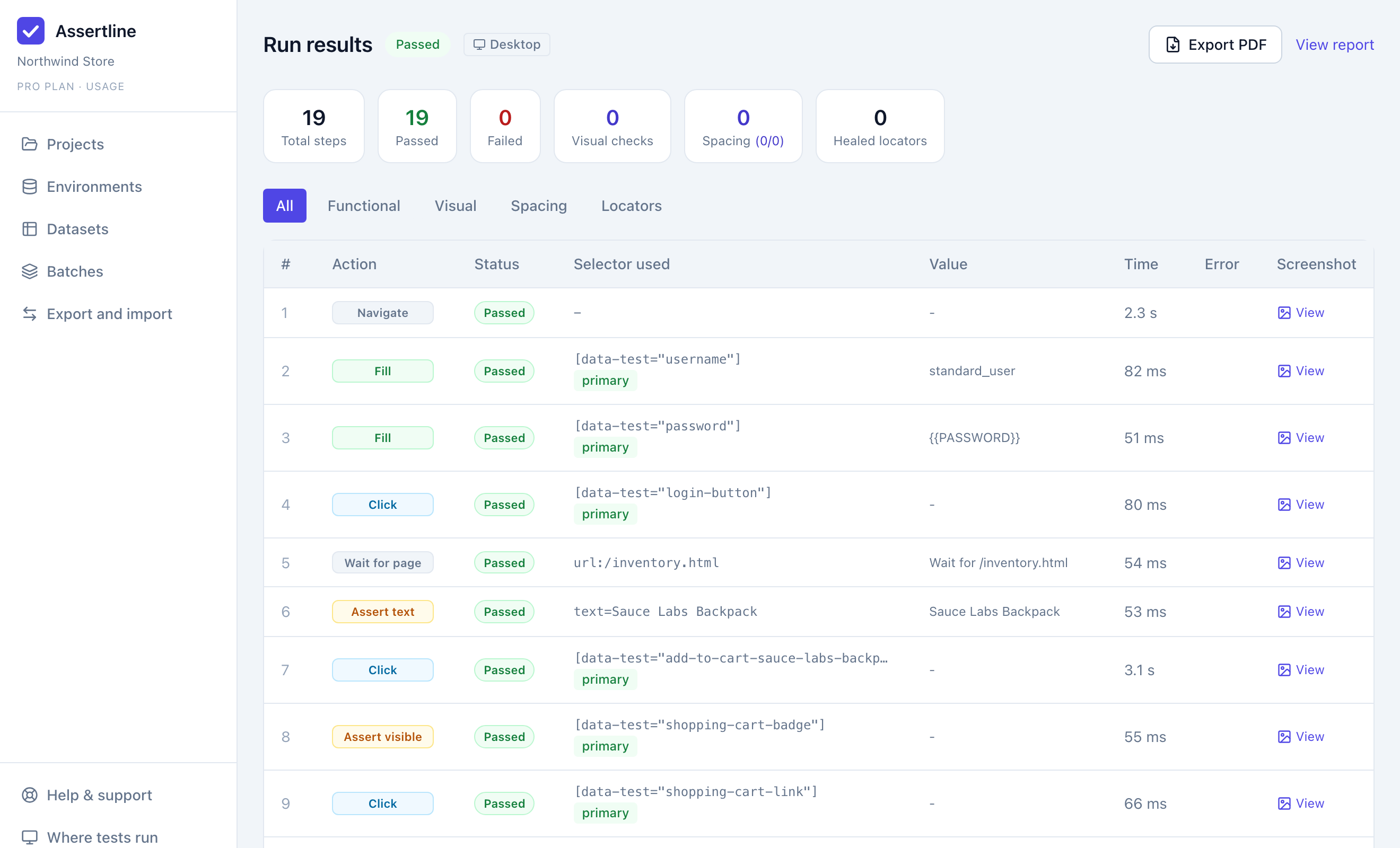
A recorded checkout flow, replayed: one verdict, one screenshot and one timing for every step.
How it works
From a click-through to a regression test in three steps
Record
Start the Assertline Recorder in Chrome and use your application. Clicks, typing, key presses, hovers, file uploads, dialogs and page changes become steps as you go.
Add checks
Point at what must be true: text on the page, an element, the address, a network call and its response, or a component compared with its Figma design.
Run anywhere
Replay in your own browser, on your machine, from your pipeline or on our cloud. Every run reports each step with a screenshot, so a failure shows you where and why.
Stable by design
Tests that survive a redesign
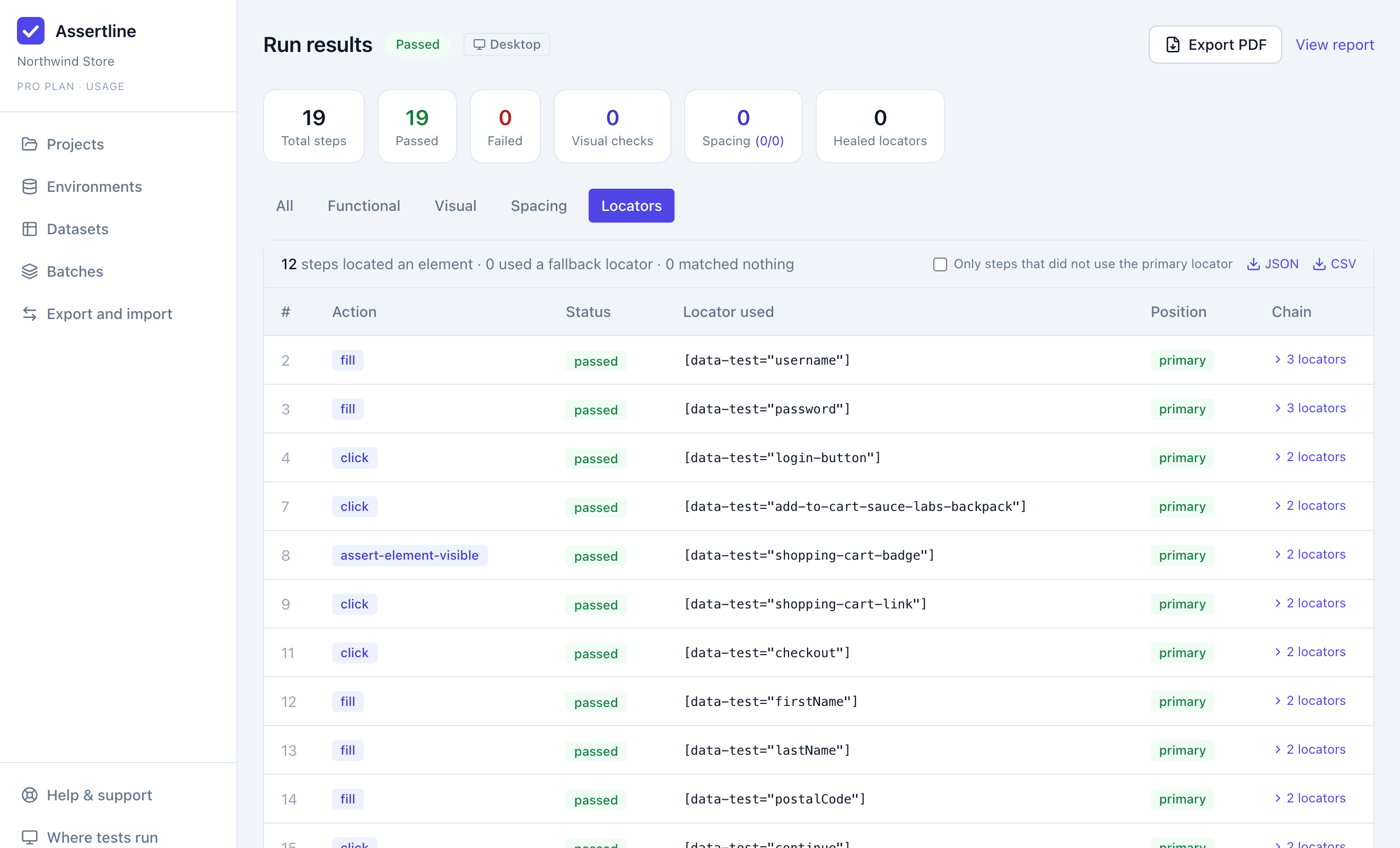
Most recorded tests break the first time a class name changes. Assertline records up to seven independent ways to find each element and lets them vote at replay.
- Test attributes, labels, roles, text and structure, ranked by how well they hold up
- One drifted selector cannot pick the wrong element on its own
- Every run shows which locator was used and which ones no longer match
Safe to share
Passwords never become test data
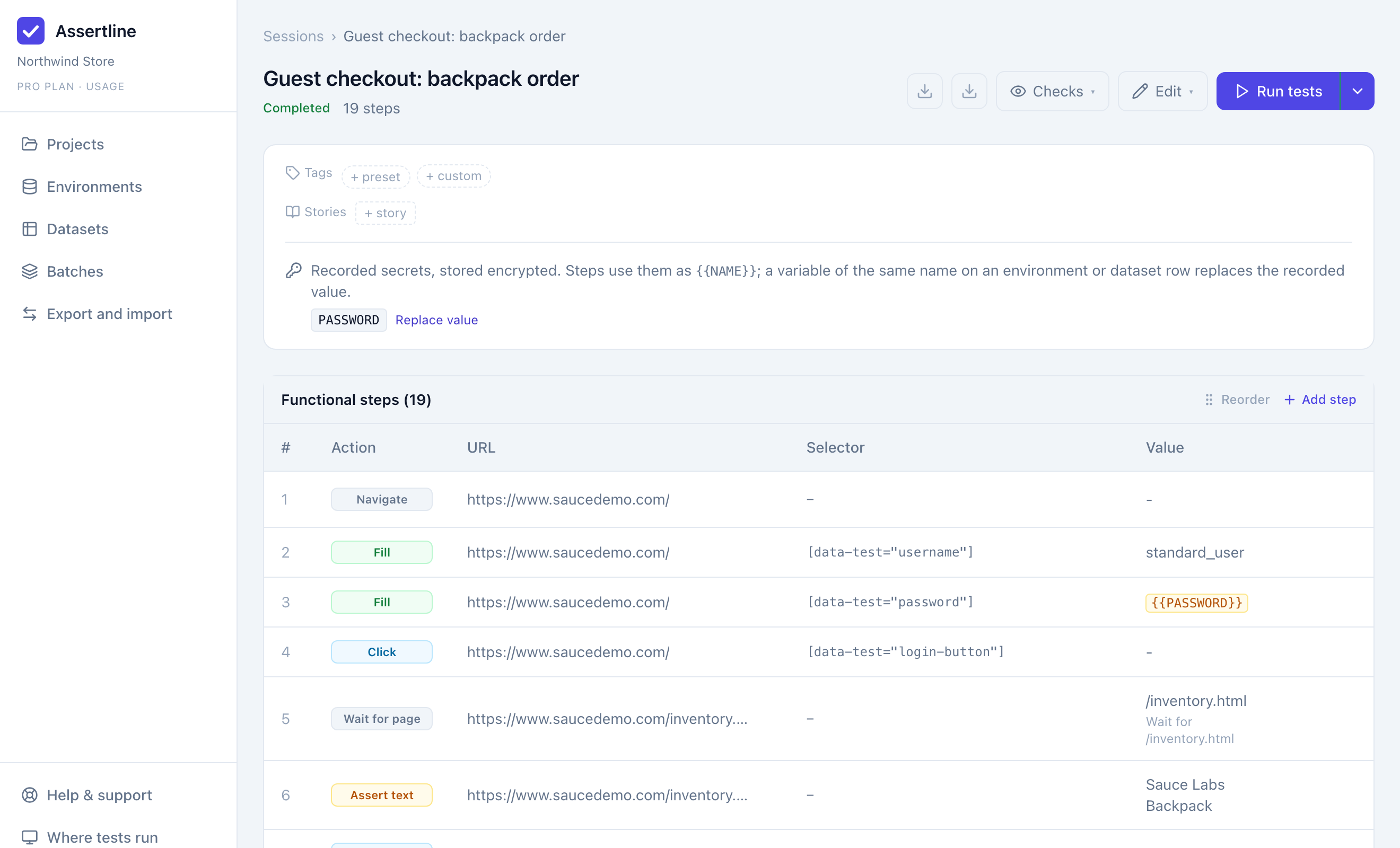
A password, card number or one-time code typed during a recording is stored encrypted and replaced in the step by a named variable. Nobody reading the test, a report or a log sees the value.
- Environments supply different values for staging and production
- Datasets run the same flow once per row of data
- Credentials in captured network traffic are redacted before they leave the page
Checks
Assert what the application does, not only what it shows
A page can look right while the order never reached the server. Assertline checks the interface, the traffic behind it and the design it was built from.
Page checks
Text is visible, an element is present or gone, the address is the one you expect. Each waits for the page to settle before it decides.
Network checks
Pick a request from the ones your step caused and assert its status, response time, headers, query and JSON fields, how many times it was made, or that it was never made at all.
Design checks
Compare a component on the page with its Figma node: colours, type, radius and size, plus the spacing between two elements. Drift from the design fails the run.
# A network check on the "Place order" step
request   POST /api/orders
status    equals 201                  ✓
duration  less than 800 ms            ✓
response  $.order.total equals 32.39   ✓
response  $.order.items length is 1    ✓
calls     exactly 1                   ✓

# And one that must never happen
request   POST /api/payments/charge
expect    not called                  ✓
An illustration of the rules a network check can hold. You build them by clicking, not by writing this.
Where tests run
One recording, run wherever you need it
The same engine produces the same verdict everywhere, so a test that passes on a laptop means the same thing in the pipeline.
In your browser
Replay inside the Chrome you are signed in to, with your session and your network. Nothing to install beyond the extension.
On your machine
The desktop app runs tests in the background and on a schedule. Staging servers behind your firewall stay behind it.
In your pipeline
A command-line runner starts a test or a whole batch from CI and exits non-zero when anything fails.
On our cloud
Hosted browsers run tests in parallel with nothing for you to operate. Evidence is kept for you to review later.
Across browsers
Connect your own BrowserStack account and run the same test on Chrome, Edge, Firefox and Safari's engine, side by side.
On phone and tablet sizes
Choose a device profile for a run and the page is tested at that screen size and touch behaviour.
For teams
Built for the whole team, and for the people who answer for quality
Workspaces and roles
Each organization's projects, tests and results are its own. Owners and admins manage people, keys and billing.
Batches
Run a suite of recordings together and get one result for the release.
Reports
Every run is a shareable report with screenshots, exportable as a PDF.
Notifications
Send finished runs and batches to a Slack channel.
Honest verdicts
A run is passed only when every step reported. A site that blocks automated browsers is reported as blocked, never as a pass.
Isolated cloud runs
Hosted browsers can reach the public internet and nothing else: not our network, not yours.
Encrypted secrets
Secret variables and recorded credentials are encrypted at rest and never returned by the API.
Least-privilege keys
Pipeline and runner keys can start and report runs. They cannot read members, billing or change your tests.
Record your first test in a few minutes
Start on the Free plan with up to three people and run tests in your own browser at no cost. Upgrade when you want the cloud, CI and cross-browser runs.